The world of search is changing. A few years ago, if you searched a database for “healthy greens,” and your data only contained the word “broccoli,” you might have come up empty-handed. Traditional databases rely on exact keyword matching, which works for structured data like SKU numbers but fails miserably when it comes to human nuance.
Enter FAISS (Facebook AI Similarity Search). Developed by Meta’s Fundamental AI Research (FAIR) team, FAISS isn’t just a database; it’s a high-performance library designed to help computers “understand” similarity. Whether you’re building a recommendation engine for an e-commerce giant or a Retrieval-Augmented Generation (RAG) system for a custom LLM, FAISS is the industry-standard engine under the hood.
In this guide, we’ll break down what FAISS is, why it’s a game-changer for AI developers, and walk through a practical implementation to get you started.
What is FAISS and Why Should You Care?
At its core, FAISS is an open-source library for efficient similarity search and clustering of dense vectors.
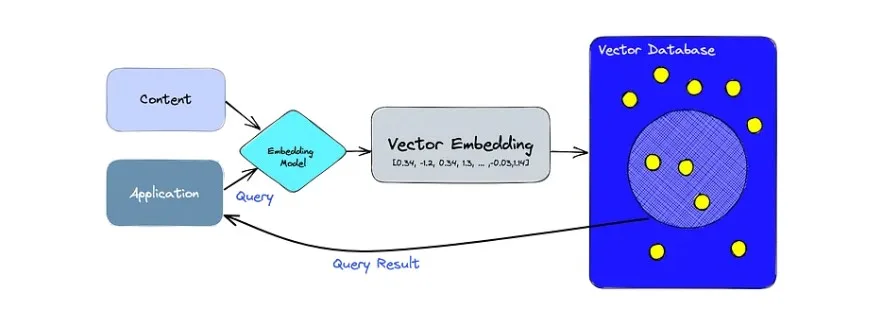
Wait—what are dense vectors? Think of them as numerical “fingerprints” of data. When you convert a piece of text, an image, or an audio clip into a vector (a process called embedding), you’re turning abstract information into a string of numbers. In this numerical space, items that are conceptually similar—like “cauliflower” and “healthy vegetables”—are physically close to each other.
Why FAISS Wins Over Traditional Databases:
- Speed at Scale: FAISS can search through billions of vectors in milliseconds.
- Memory Efficiency: It uses clever compression techniques to fit massive datasets into RAM.
- Flexibility: It integrates seamlessly with Python and popular AI frameworks like LangChain.
- Hardware Optimized: It can leverage GPUs to supercharge search speeds even further.
Core Concepts: How FAISS “Thinks”
To use FAISS effectively, you need to understand two primary components: Embeddings and Indexes.
1. Embeddings (The Digital Fingerprint)
Before FAISS can search anything, your data must be converted into vectors. We use models like BERT or Sentence-Transformers to do this. For example:
- “I love hiking” → [0.12, -0.59, 0.88, …]
- “Outdoor activities are great” → [0.11, -0.57, 0.85, …]
Because the numbers are similar, FAISS knows the sentences are related.
2. The Index (The Library Map)
An index is the data structure FAISS builds to organize these vectors. Choosing the right index is a trade-off between speed and accuracy:
- IndexFlatL2: A “brute-force” search. It’s 100% accurate but gets slower as your data grows.
- IndexIVFFlat: Splits the space into “voronoi cells” (clusters). It only searches the most relevant clusters, making it much faster for large datasets.
- HNSW (Hierarchical Navigable Small World): A graph-based approach that is incredibly fast for high-dimensional data.
Step-by-Step Guide: Building a Simple Semantic Search Engine
Let’s walk through a practical example using Python. We’ll build a system that can identify “Health” or “Technology” topics even if the exact words aren’t present.
Step 1: Install the Essentials
You’ll need the FAISS library and a tool to create embeddings (we’ll use sentence-transformers).
Bash
pip install faiss-cpu sentence-transformers pandas spacy
python -m spacy download en_core_web_sm
Step 2: Prepare and Clean Your Data
In a real-world scenario, your data is messy. Use a library like spaCy to remove “noise” (like “the”, “and”, or punctuation) so the AI focuses on the meaningful words.
Python
import pandas as pd
import spacy
nlp = spacy.load(‘en_core_web_sm’)
def clean_text(text):
doc = nlp(str(text).lower())

# Remove stop words and punctuation, then lemmatize (running -> run)
tokens = [token.lemma_ for token in doc if not token.is_stop and not token.is_punct]
return ” “.join(tokens)
# Sample Data: Imagine a CSV with a ‘Text’ column
data = {
‘Text’: [
“I like eating healthy vegetables and fruits”,
“Chicken is a good source of protein”,
“The new smartphone has a 5G chipset”,
“Latest advancements in quantum computing”
],
‘Category’: [‘Health’, ‘Health’, ‘Tech’, ‘Tech’]
}
df = pd.DataFrame(data)
df[‘Clean_Text’] = df[‘Text’].apply(clean_text)
Step 3: Create Vector Embeddings
We will use the all-MiniLM-L6-v2 model. It’s lightweight, fast, and perfect for most English-language tasks.
Python
from sentence_transformers import SentenceTransformer
model = SentenceTransformer(‘all-MiniLM-L6-v2’)
vectors = model.encode(df[‘Clean_Text’])
Step 4: Indexing with FAISS
Now, we feed these vectors into FAISS. Since our dataset is small, IndexFlatL2 is the perfect choice for perfect accuracy.
Python
import faiss
import numpy as np
dimension = vectors.shape[1] # The ‘length’ of our vector

index = faiss.IndexFlatL2(dimension)
index.add(vectors.astype(‘float32’)) # FAISS prefers float32
Step 5: Querying the Database
Let’s test it. If we search for “I like eating cauliflower,” the system should point us toward the “Health” category, even though “cauliflower” isn’t in our original list.
Python
query = “I like eating cauliflower”
query_vector = model.encode([clean_text(query)]).astype(‘float32’)
# Search for the 2 most similar items
distances, indices = index.search(query_vector, k=2)
print(“Top Results:”)
print(df[‘Text’].iloc[indices[0]])
Fresh Insights: 3 Tips for Production-Ready FAISS
If you’re moving beyond a hobby project, keep these “pro tips” in mind to avoid common pitfalls:
1. The “Normalization” Secret
If you use Cosine Similarity (which measures the angle between vectors) instead of L2 Distance (Euclidean distance), remember to normalize your vectors before adding them to the index. This ensures that the length of the text doesn’t skew the results. Use faiss.normalize_L2(vectors) for better semantic accuracy.
2. Don’t Forget Metadata
FAISS is a library, not a full-featured database like PostgreSQL. It stores vectors and IDs, but it doesn’t store your original text or timestamps. In a production environment, you should use a hybrid approach: store the vectors in FAISS for the fast search, and store the actual content (metadata) in a traditional database (like MongoDB or SQL) using the FAISS IDs as the link.
3. Choose Your Index Wisely (The 1M Rule)
If you have fewer than 1,000,000 vectors, stick to IndexFlatL2. Modern CPUs are fast enough that the complexity of “approximate” indexes isn’t worth the slight loss in accuracy. Only move to IVF or HNSW once you hit the million-row mark or notice significant latency.
Summary and Takeaways
FAISS has democratized high-speed semantic search, taking it out of the hands of tech giants and making it accessible to any developer with a Python environment. By moving away from keyword matching and toward vector similarity, you can build applications that truly “understand” what a user is looking for.
Key Takeaways:
- Semantic Power: FAISS finds meaning, not just words.
- Pre-processing Matters: Cleaning your text with spaCy leads to much cleaner “fingerprints.”
- Scale with Ease: From 10 rows to 10 billion, FAISS provides the architecture to grow.
Whether you’re building the next great AI assistant or just trying to organize a massive library of documents, FAISS is the reliable, open-source backbone you need to get the job done efficiently.
